Stop asking if it’s ready.
Car wash, repair, alteration, order: every drop-off becomes a ticket you follow in . You’re told when it’s ready.
Your car is at the wash?
Follow everything on
No more blah blah.
No more calls to ask if it’s ready. The ticket says it, and you get a heads-up at the right time.
- Hello, is it ready?
- Not yet.
- Tomorrow?
- Call back around noon.
- Hello? Blah blah blah?
- Blah blah.
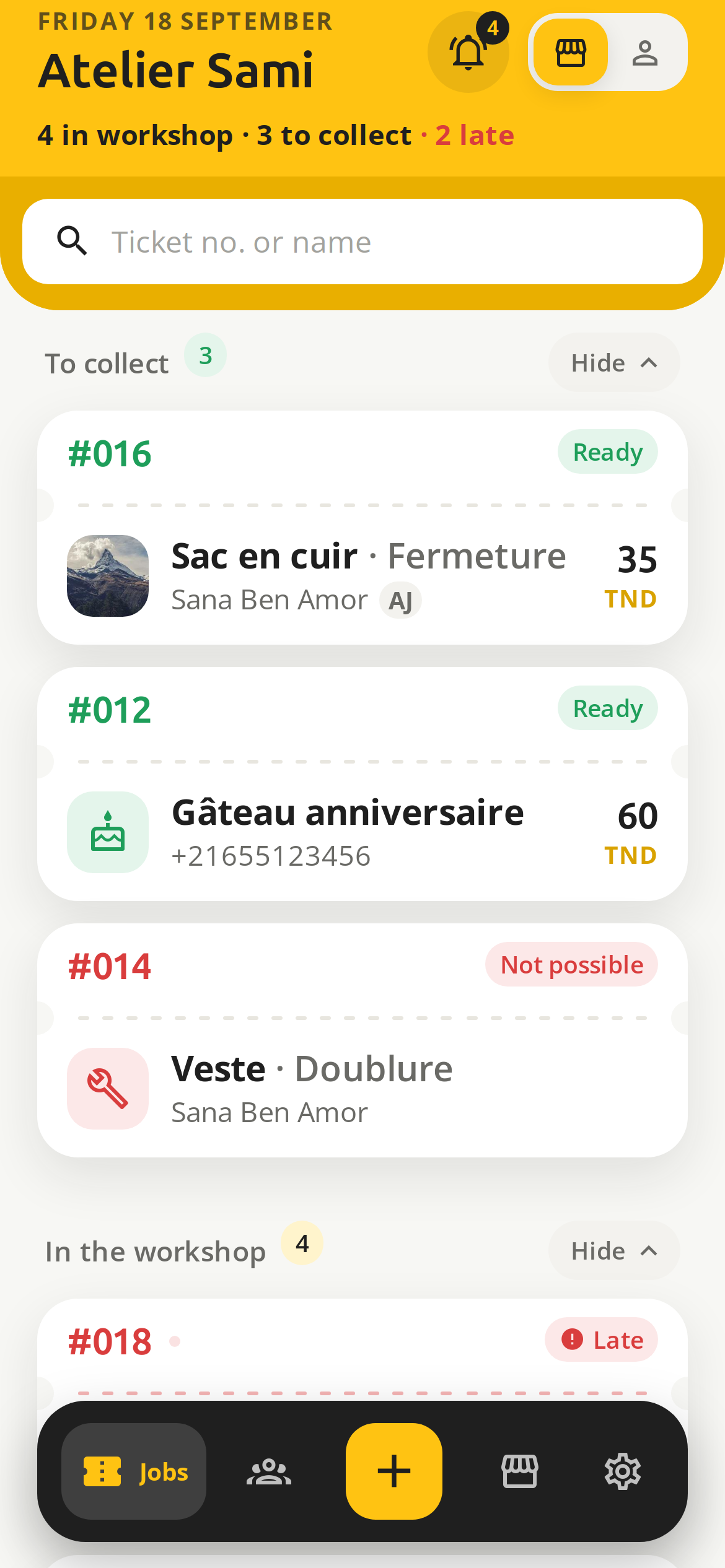
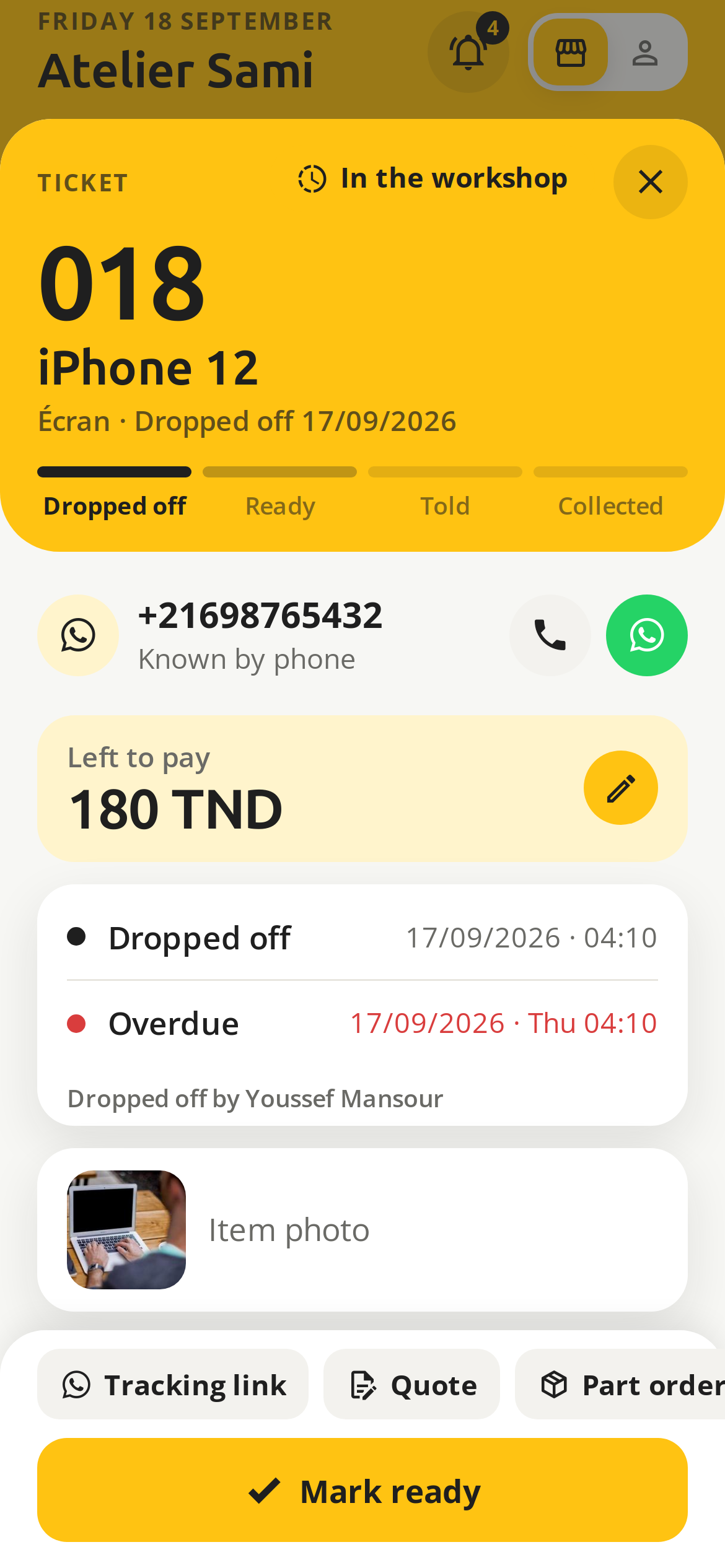
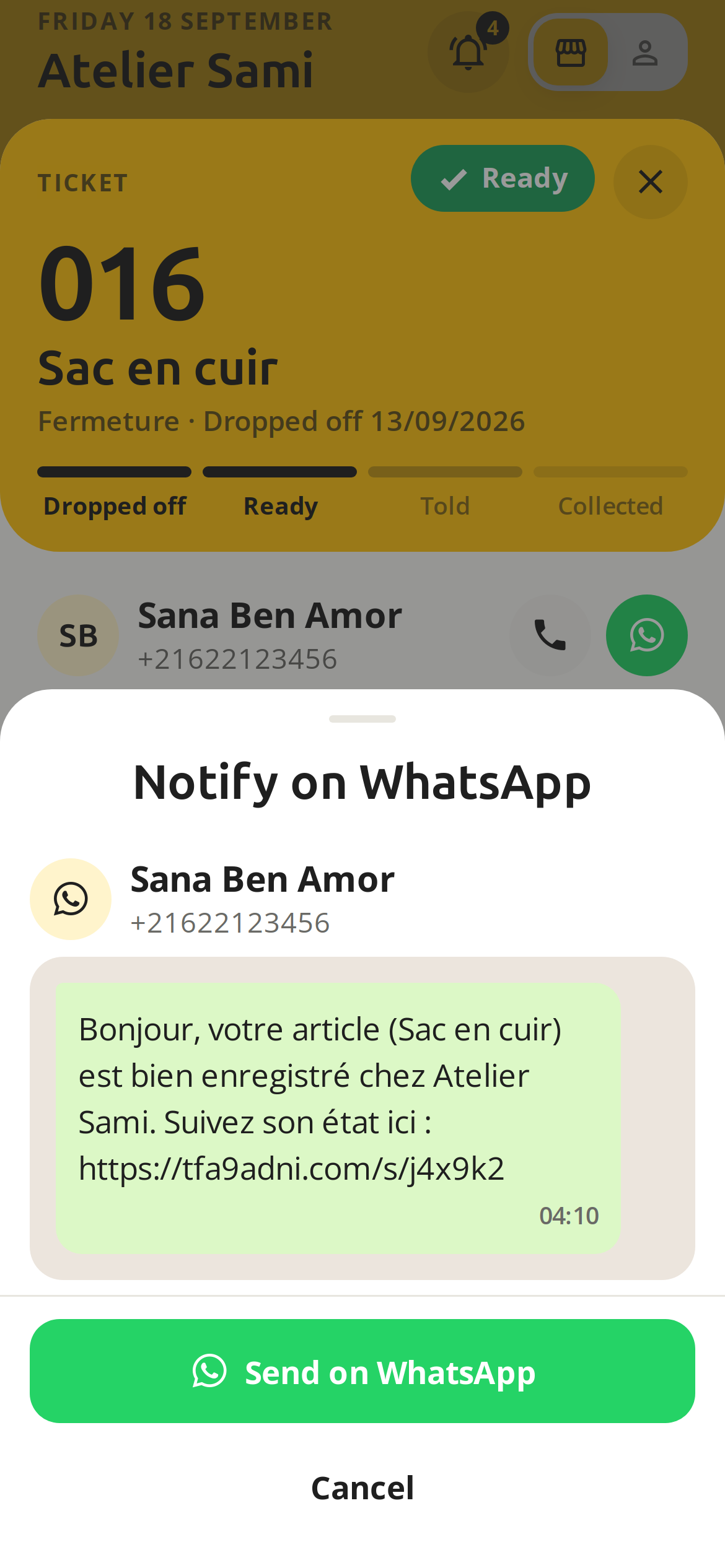
Three moves at the counter.
- 1
Drop off
Photo, what, for whom, how much. The ticket comes out with its number.
- 2
Mark ready
One button when the work is done. The client sees it on their page at once.
- 3
Notify on WhatsApp
The message is already written. You send it with one finger.
Made for the counter.
- Car wash
- Tailor
- Phone repair
- Watchmaker
- Locksmith
- Pastry
- Dry cleaner
- Garage
- Bikes
- Electronics
- Caterer
- Jeweller
- Leather
- Computers
- Appliances
- Bakery
What the ticket can do.
-
QR client card
One scan and the ticket is in their name. No account to create.
-
WhatsApp
The message leaves from your WhatsApp, not from a bot.
-
Loyalty
A stamp card you design yourself.
-
Quotes
A proposed price, the client accepts from their page.
-
Team
Your staff create tickets without touching the rest.
-
Insights
Average turnaround, services that pay, month by month.
-
Waiting for a part
The client sees you are waiting for the part, and the expected date.
-
Ask for news
From the app, a waiting client can nudge you, once a day.
-
Receipt or QR
The ticket prints on 58 mm paper, or its QR shows on your screen.
-
Someone close follows
Pass the link to whoever picks it up: they follow the item, the price and the promised day, without changing anything.
-
Price history
Every price change is kept and sent to the client.
-
In the calendar
The promised day goes into the client’s calendar.
-
Offline
No signal? The ticket waits and sends itself.
-
Counter queue
The client scans your poster or holds their phone to yours: they take a place and see their rank.
-
Dictate the ticket
One sentence fills in the item, the service, the price and the day.
-
Running late
A new date and the reason, sent to the client in one tap.
-
Unexpected closure
A banner on your page, and your clients told.
-
On the lock screen
The client sees “Ready” without opening the app, on iPhone and Android.
-
Hide from family
A client keeps one ticket to themselves, even when family follow them.
-
Verified shops
Photo and address checked before every shop opens.
-
Explore
Your shop in the directory, with your hours.
Everything, in one place.
Car wash, tailor, repairer: every artisan is on the same network. The client follows all their items through one portal, and other platforms plug into it.
Client side
They scan the poster, see where their item is, know when to come.
Switch sides to walk into the shop
Stamp it.
A loyalty card you design, that the client keeps in the app.
Tap the card to stamp
6 stamps, a free polish
Plugs into anything.
A public API so your point of sale, ERP or online shop can create and read tickets, with webhooks.
On request during launch: write to us and we switch the API on for your shop.
POST /v1/tickets
{ "service": "Ressemelage", "item": "Bottes",
  "client_phone": "+216 22 000 000", "price_minor": 25000 }

→ { "number": 19, "state": "workshop" }- Client notifiedclient.notified #019
- Readyticket.ready #018
- Ticket createdticket.created #017
Simple, like a ticket.
No training, no hardware to buy: your phone is enough. One ticket per drop-off, like at the counter, and your clients stay yours.
Questions.
01 Can a shop add me without my consent?
No. A ticket filed under your number is offered to you: you accept it, or you block the shop. Every page also has a button to report it.
02 Do my clients need to install the app?
No. They scan the QR on the poster and follow their ticket on a web page. The app is a bonus for the card and notifications.
03 Is it WhatsApp Business?
No. The message opens in your WhatsApp, already written. You press send.
04 What about no signal?
The ticket is created anyway and sends as soon as the signal is back.
05 Which language?
Arabic, French, English. Everyone picks their own, you and your clients.
06 Where do the photos go?
They are deleted 7 days after the item is picked up. Nothing is sold to anyone.
07 How long are tickets kept?
A ready item never picked up is closed after 60 days. A ticket left in the workshop with no update is closed « without news » after 60 days: the shop is warned at 30 days and the client is asked to contact it. The tracking page shows a finished ticket for 3 days, and every ticket is erased 6 months after it closes.
08 How do I delete my account?
In the app, under Settings: delete only your shop, or your whole account.
09 Which countries?
Tunisia first. Algeria, Libya and Morocco next.
Download
In Arabic, French and English.